
Screenshots
App details
- Updated
- June 3, 2020
- Requires
- Windows 7, Windows 2003, Windows Server,...
- Developer
- UpClock Software
- Category
- Mobile
SoftPas in:
This product is also available in the following languages:
About Keyboard Tracer
Download Keyboard Tracer – keylogger, keystroke logger, monitor computer, keyboard tracker, privacy tool
Overview
Keyboard Tracer is a productivity-focused utility designed to capture and record all keyboard input on Windows-based systems. It functions as a monitoring tool, enabling users to track keystrokes across various applications, including those involving sensitive data such as passwords and personal messages. The app operates discreetly in the background, launching automatically with Windows startup, which makes it ideal for environments where oversight is required without user awareness. Its primary use cases include monitoring shared or personal computers in homes, offices, or educational settings where accountability and security are priorities.
Designed for users who need comprehensive insight into keyboard activity, Keyboard Tracer serves both personal and professional purposes. It may be used by parents monitoring children’s computer use, employers overseeing employee productivity, or individuals securing their own devices against unauthorized access. The software is particularly relevant in scenarios where visual or behavioral monitoring is insufficient, and a detailed log of input is essential. Despite its powerful functionality, the developer has not provided additional background information on the company or development team.
As part of the broader Windows utility ecosystem, Keyboard Tracer fills a niche in digital oversight tools. While similar applications exist, its combination of keystroke logging, clipboard tracking, and periodic screenshot capture positions it as a multifaceted monitoring solution. The app’s lightweight design—only 1.2 MB in size—suggests minimal system impact, making it suitable for older or low-resource machines. Its free pricing model further enhances accessibility for users seeking no-cost monitoring solutions.
Key Features & Functionality
- Invisible Background Operation: Keyboard Tracer launches automatically at Windows startup and runs undetected in the background. This stealth functionality ensures that users are unaware of its presence, making it effective for long-term monitoring without interference.
- Comprehensive Keystroke Logging: The software captures every keystroke, including standard letters, numbers, special characters, and modifier keys such as Shift, Ctrl, and Alt. It records the actual input as typed, providing an accurate and detailed record of user activity.
- Detailed Activity Logs: Each recorded keystroke is timestamped to the millisecond and linked to the active application window’s caption. This allows users to reconstruct exactly when and where specific inputs occurred, enhancing traceability across different programs.
- Clipboard and Screenshot Tracking: In addition to keystrokes, Keyboard Tracer logs changes to the clipboard, which is useful for detecting copied sensitive data. It also takes automated screenshots at set intervals, offering visual confirmation of user behavior.
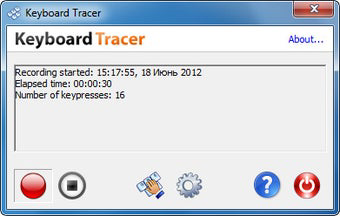
- User-Friendly Interface: Despite its advanced capabilities, the app includes an intuitive graphical user interface. Users can access logs, adjust settings, and manage tracking preferences without requiring technical expertise.
For example, a parent might use Keyboard Tracer to monitor a child’s online activity, while an employer could use it to ensure employees are not sharing confidential information via copied text. The ability to link keystrokes to specific windows adds context, making logs more actionable and meaningful.
Interface, UX & Performance
Keyboard Tracer features a minimalistic graphical interface designed for straightforward navigation. The layout is clean and organized, with clearly labeled sections for logs, settings, and tracking controls. Although the developer did not provide detailed information about UI design principles, the interface appears optimized for ease of use, even for non-technical users.
Navigating between features is smooth, with intuitive menu options and accessible controls. The app does not appear to rely on complex workflows, reducing the learning curve. However, since the software operates primarily in the background, the interface is used mainly for configuration and log review rather than real-time interaction.
Although the developer did not list formal performance metrics, the app’s file size of 1.2 MB suggests low resource consumption. It is expected to run efficiently on a wide range of Windows systems, including older hardware. The app’s stability and responsiveness are likely consistent with lightweight utilities, though specific testing across device categories was not disclosed. No reports of crashes or high CPU usage were mentioned in the provided information.
Platform Compatibility & Technical Requirements
Keyboard Tracer is designed exclusively for the Windows operating system. It is compatible with Windows platforms, though specific OS versions were not listed. The app has a file size of 1.2 MB, indicating a lightweight installation that requires minimal disk space.
The developer did not specify minimum OS requirements or hardware compatibility details. As such, users should verify system compatibility before installation. The app is available as a free download, with no in-app purchases or subscription fees. No information was provided about updates or version history beyond the initial release date of June 3, 2020.
Pros and Cons
- Free to download and use with no hidden costs
- Lightweight at only 1.2 MB, suitable for low-end systems
- Operates invisibly in the background, ideal for discreet monitoring
- Records keystrokes, clipboard changes, and screenshots
- Provides detailed logs with millisecond timestamps
- Simple interface suitable for non-technical users
- No official documentation or support resources provided
- Compatibility with specific Windows versions not disclosed
- Operating system requirements were not listed
- Long-term usage without updates may raise security concerns
- Stealth mode may be considered unethical or illegal in certain jurisdictions
FAQ
Is Keyboard Tracer safe to use on my computer?
Yes, the app is designed to run as a lightweight utility on Windows systems. However, users should ensure they have proper authorization before installing monitoring software, as unauthorized use may violate privacy laws.
Can I install Keyboard Tracer on multiple devices?
While the app is free to download, the developer did not specify licensing terms for multi-device use. Users should assume installation is limited to one system unless otherwise stated.
Does Keyboard Tracer require an internet connection?
The provided information does not indicate whether an internet connection is required. The app may function offline, but this cannot be confirmed without further details.
How often does Keyboard Tracer take screenshots?
The software takes periodic screenshots at user-defined intervals, though the default frequency was not specified in the available data.
Is Keyboard Tracer compatible with Windows 10 and Windows 11?
Compatibility with specific Windows versions was not listed. While it may work on modern systems, users should verify functionality on their device before relying on it.
Final Thoughts
Keyboard Tracer presents a straightforward, no-cost solution for monitoring keyboard activity on Windows machines. Its ability to log keystrokes, clipboard changes, and capture screenshots makes it a powerful tool for oversight in private or shared environments. The app’s lightweight nature and invisible operation enhance its practicality, especially on older or resource-constrained systems.
While it lacks detailed documentation and formal support, its core functionality is clear and focused. Users seeking a simple, effective monitoring utility will find value in its features. However, ethical and legal considerations must be carefully evaluated before deployment, particularly in shared or workplace settings.
For those who need reliable keystroke tracking without cost or complexity, Keyboard Tracer delivers a functional experience. Download Keyboard Tracer now.
Guides & Tutorials
How to install Keyboard Tracer
- Click the Download button above.
- Once redirected, accept the terms and click Install.
- Wait for the Keyboard Tracer download to finish on your device.
How to use Keyboard Tracer
This software is primarily used for its core features described above. Open the app after installation to explore its capabilities.
User Reviews
No reviews yet. Be the first to share your experience.
You may also like
more
Que no te pillen¡
About !Que no te pillen¡Reviewed by Jason A. BilbreyShow MoreShow Less

3D Combat Zone
About 3D Combat ZoneOriginally released in 1983, 3D Combat Zone immerses players...

666: El día del portal
About 666: El día del portalOn June 6, 2006, Agent P. Stone uncovers a sinister...

80 in 1 Best Flash games
About 80 in 1 Best Flash games 80 in 1 Best Flash games is a collection of 80 fl...

ABYSS SEEKERーーWhat Do You See Deep in The Abyss
About ABYSS SEEKERーーWhat Do You See Deep in The AbyssIn ABYSS SEEKER, players...

ACA NEOGEO THE KING OF FIGHTERS 2002 for Windows
About ACA NEOGEO THE KING OF FIGHTERS 2002 for WindowsTHE KING OF FIGHTERS 2002,...